Stellarium on tasuta avatud lähtekoodiga planetaarium sinu arvutile. See näitab realistlikku taevast 3D-s, just nagu sa näed palja silmaga, binokliga või teleskoobiga.
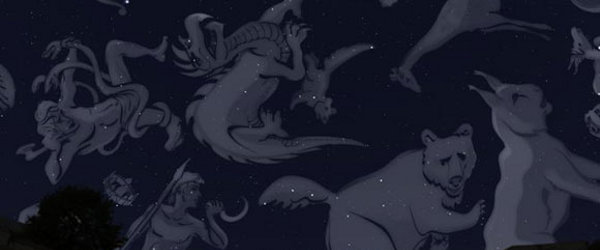
Üksikasjade nägemiseks klõpsa vasakul pildil.


kasutajate pakutud maastikud
Meil on maastikuid seitsmele kontinendile (seitsmekontinendilises mudelis) - kõikidele, ka Antarktikale!
kuidas paigaldada maastikke
Pärast sellelt lehelt maastiku .zip faili allalaadimist on vaja see Stellariumi paigaldada.
automaatne
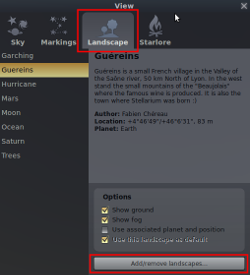 Kui sul on Stellarium versiooniga 0.10.6 või uuem, saad maastike automaatseks paigaldamiseks kasutada funktsiooni 'Lisa/eemalda maastikke':
- Ava 'Taeva ja vaate valikute aken', klõpsates vasakpoolsel nupuribal vastaval nupul (või vajuta klahvi F4).
- Nupp 'Lisa/eemalda maastikke' asub vahelehe 'Maastik' allosas.
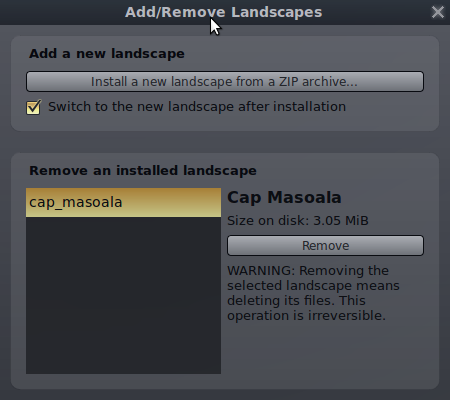
- Seda vajutades avaneb aken 'Lisa/eemalda maastikke'. Seal saab paigaldada maastikke sisaldavaid .zip faile. Seal on välja toodud ka kõik kasutaja paigaldatud maastikud ning saab neid eemaldada.
Pane tähele, et kuigi see teeb maastike paigaldamise lihtsamaks, võib selle tulemusena kahe silma vahele jääda, mis seal ZIP-arhiivis veel leidub.
Landscape packages created without this feature in mind may contain other files, such as alternative textures in different sizes.
käsitsi
Kui kasutad Stellariumi vanemat versiooni, võid maastikupaki paigaldamiseks järgida seda protseduuri:
- Mine oma kasutajaandmete kausta, mis on igas operatsioonisüsteemis erinev.
- Loo oma kasutaja kaustas kaust nimega landscapes (kui seda pole olemas).
- Paki lahti maastiku .zip fail kausta landscapes (kui see on õigesti tehtud, peaks igale maastikule loodama alamkaust).
kaasaaitamised
Please feel free to contribute your own custom landscapes here. Make thumbnails 200x114 pixels to fit with the rest of the page. Please include a location section in your landscape.ini file with the longitude, latitude, altitude and planet for the location of the landscape (see one of the pre-existing landscapes for an example).
To find out more about how to create a landscape, see the Stellarium User Guide, and examine existing landscapes. If you are having problems, posting to the forums is a good way to get some advice.
tähtis märge pildimõõtmete kohta
OLULINE: kontrolli, et kõik pildifailid oleks 2 täisarvulised astmed, näiteks 256, 512, 1024, 2048, 4096 8192, 16384, ... Näiteks 4096x1024, 2048x2048 vms.
This is a limitation of OpenGL. Some video hardware will work OK with images with different image dimensions, but many will not display properly, suffer vastly reduced frame rates, and even crash the computer.
Please make sure all contributed landscapes conform to these requirements, or your link may be removed.
Be aware that many people's video hardware cannot handle very large textures. This is hardware and driver dependent. A typical maximum image size is 2048x2048 or 4096x4096.
paki sisu
Please package your landscape in a .zip file with all files inside a directory in the .zip file. This should be unique to your landscape, and it would be nice if it was all lower-case with no spaces.
You should also include a readme.txt file which describes the landscape and specifies any usage restrictions or licensing terms for the images used in the landscape.
litsentsimine
Before you distribute images as part of a Stellarium landscape, please ensure you are legally entitled to - you must be the copyright holder for the images, or be able to distribute them for use with Stellarium under the terms of some agreement with the copyright holder (e.g. Creative Commons licensed images found on the web).
It is important to explicitly state what use may be made of images for your landscape. This should be done in the readme.txt file inside the .zip file.
We recommend an open source license compatible with Stellarium itself (i.e. the GNU GPL), or one of the Creative Commons licenses.
faili kodeering
The landscape.ini and readme.txt files should be UTF-8 encoded text or plain ASCII. It's probably a good idea to adopt the Windows line ending encoding, (i.e. CR LF). Both Windows and *nix style line ending encoding should work OK in Stellarium, but Windows users will have an ugly time reading the readme.txt if it uses *nix-style newlines.
vajad majutust?
Kui sul on maastik, mida soovid jagada, kuid pole veebiruumi, kuhu seda panna, saada e-kiri ühele Stellariumi arendajale ja me paneme selle oma saidile üles.
